How to Make an Airbnb Welcome Book: What to Include + Examples
Learn how to make an Airbnb welcome book guests will read and use: what to include, real examples, and how to build a digital one for free with Staysy.
Staysy Team
10 min read
On this page
An Airbnb welcome book is a guide that gives guests everything they need for their stay in one place: check-in steps, WiFi, house rules, local recommendations, emergency contacts, and checkout instructions. A good one answers questions before guests think to ask them, which means fewer messages for you and a smoother arrival for them. Staysy lets you build a digital welcome book for free and share it with every guest as one link, with nothing for them to download.
Whether you host one apartment on Airbnb or a handful of homes across Vrbo and Booking.com, this guide covers what to include, how to make an Airbnb welcome book step by step, and real examples you can borrow.
What is an Airbnb welcome book?
A welcome book, sometimes called a house manual, guest welcome book, or welcome guide, is the reference guests turn to once they arrive. Traditionally it was a printed binder on the kitchen counter. Today, more hosts use a digital welcome book: the same content, delivered as a link guests open on their phone before and during the stay.
Airbnb lets you add a house manual and check-in details to your listing; a dedicated welcome book goes further. It holds your local tips, appliance how-tos, safety information, and checkout steps in one organized guide that you control, and it works the same way whichever platform the guest booked through.
Why every Airbnb needs a welcome book
A welcome book is the foundation of good guest experience management: guiding guests through every stage of the stay with the right information at the right time. It pays off in three ways.
Fewer repetitive questions
Most guest messages are the same handful: what is the WiFi password, how does the lockbox work, where do I park, what time is checkout. Write the answers once and every future guest can find them without messaging you.
Smoother check-ins and better reviews
Arrival is when guests most need clear information. Easy-to-follow directions and access steps start the stay on the right foot, and that shows up in five-star reviews for check-in, communication, and overall experience.
A home that is looked after
House rules buried in a listing description are easy to miss. When rules, appliance tips, and checkout steps sit in the guide guests are already using, they get read, so your place is treated the way you want.
What to include in an Airbnb welcome book
Keep the structure simple and follow the order of a stay. These eight sections cover what guests need most.
1. A warm welcome note
Two or three friendly sentences that greet guests by name, introduce you, and tell them the best way to reach you. This sets the tone for everything that follows.
2. Check-in and access instructions
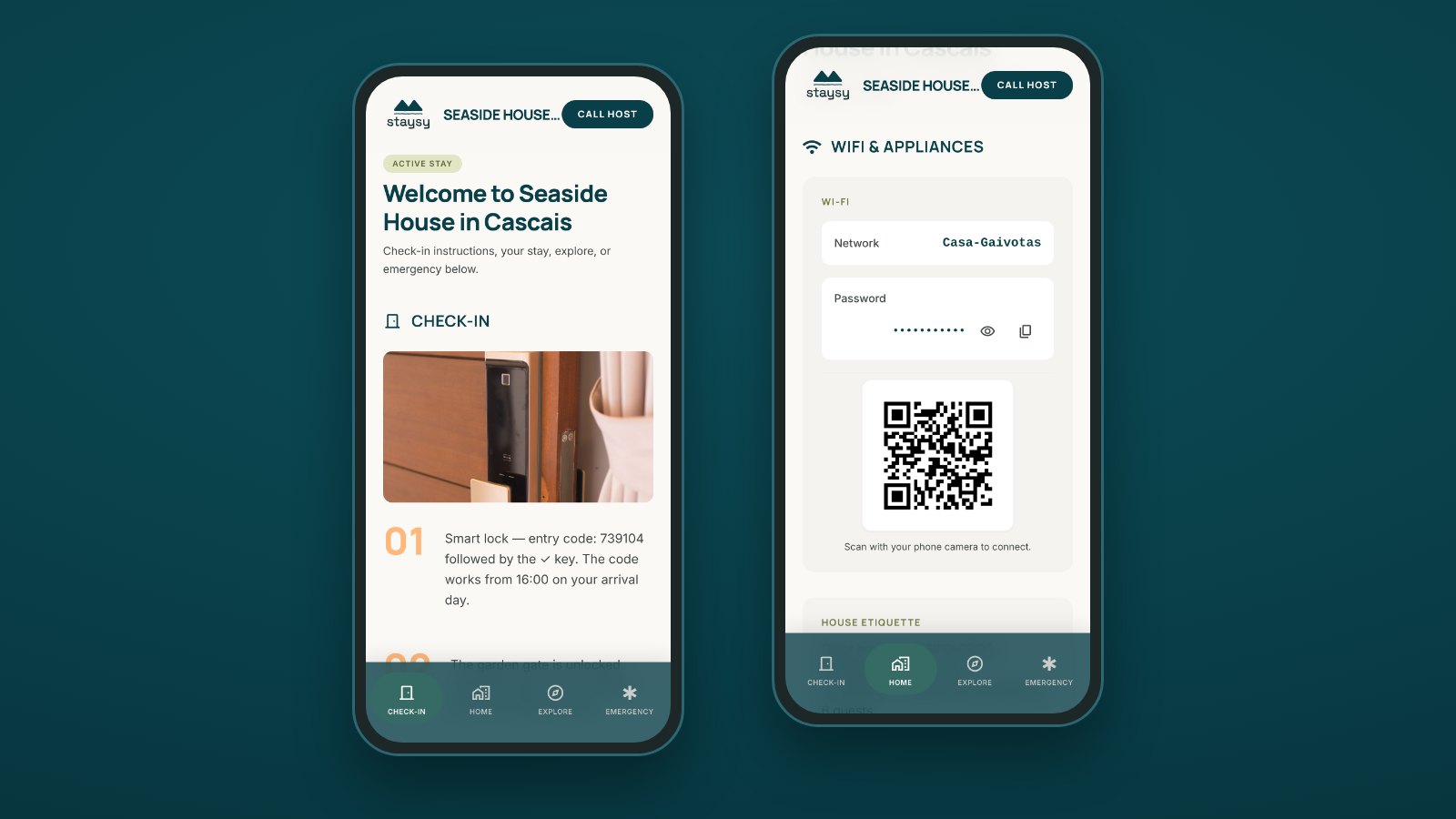
Step-by-step directions from the street to the front door, the check-in time, and how to get in: lockbox, keypad code, or smart lock. Add a photo of the entrance if it is hard to spot.
3. WiFi and appliances
The network name and password, ideally with a scan-to-connect WiFi QR code, plus short how-tos for anything guests may struggle with: the coffee machine, the TV remote, the heating, the washing machine.
4. House rules
Quiet hours, smoking, pets, parties, extra guests, and anything specific to your building, such as trash days or shared spaces. Keep the tone friendly and explain the reason behind any unusual rule.
5. Local recommendations
Your favorite coffee, restaurants, supermarkets, walks, and things to do nearby. This is often the section guests remember most, and the one they mention in reviews.
6. Getting there and parking
Directions by car, taxi, and public transport from the airport or main station, plus where to park and what it costs.
7. Emergency and safety information
Local emergency numbers, your contact and a backup contact, the nearest hospital and pharmacy, and the location of the first-aid kit, fire extinguisher, and water shut-off.
8. Checkout instructions
A short checklist for the last morning: checkout time, where keys go, what to do with towels and trash, and how to lock up. Add a thank-you and a friendly invitation to leave a review.
How to make a welcome book for Airbnb in six steps
You can put together a complete welcome book in an afternoon. Here is the process most hosts follow.
- Collect the essentials: access codes, WiFi details, appliance manuals, emergency numbers, and your rules.
- Walk through a stay as if you were the guest, and note every moment you would need help, from parking to finding the light switches.
- Choose a format: a printed binder, a PDF, or a digital welcome book like Staysy that guests open from a link.
- Write each section in short, skimmable blocks, following the eight sections above.
- Add photos of the entrance, the lockbox, tricky appliances, and the parking spot. One clear photo saves a dozen messages.
- Share it before arrival through your Airbnb messages, then update it after the first few stays based on what guests still ask.
Airbnb welcome book examples
Write your welcome book in your own voice, the way you would talk to a guest at the door. Here are three short examples you can adapt.
Example welcome note
“Hi Sarah, welcome to the Garden Flat! We are so glad you chose to stay with us. Everything you need is in this guide, and if anything is unclear, message me on Airbnb any time. Enjoy your stay. Laura”
Example WiFi and appliances section
“WiFi: GardenFlat_Guest. Password: sunflower2026, or scan the QR code on the fridge. The coffee machine takes the pods in the top drawer: fill the water tank at the back, then press the large cup button.”
Example checkout section
“Checkout is at 11:00. Please put used dishes in the sink, gather used towels in the bathroom, sort trash and recycling into the kitchen bins, and leave the keys in the lockbox. Thank you for looking after our home. Safe travels!”
Printed vs. digital welcome book
A printed welcome book feels personal, but it has limits. It can’t be read before arrival, it goes out of date the moment your WiFi password changes, and it tends to get stained, lost, or ignored.
A digital welcome book fixes those problems. Guests can read directions and check-in steps before they arrive, you can update it in seconds, and it lives on the phone they already carry. Many hosts use both: a digital guide as the main reference, and a small, printed card by the door with a QR code that opens it.
Build your Airbnb welcome book with Staysy
Staysy is an app-free digital guest guide built for short-term rentals. It works alongside Airbnb, Vrbo, Booking.com, or your own booking site, with no integration needed.
Set up once, share with every guest
A short setup asks for the address, a photo, how guests get in and a few quick details, then creates the getting-here, check-in and checkout sections for you, so you are never staring at a blank page. If you already host another place, start from it and copy the parts that stay the same. Then add your WiFi, house rules, and local tips: everything saves as you go, and the preview shows the guide as guests will see it. Share it with a unique, secure link for each booking, through Airbnb messages or your usual channel. Guests tap the link and the guide opens in their browser, with no app to download and no account to create.
Everything your welcome book needs
Almost every section in this guide has its own place in Staysy. Getting here, check-in and checkout come with every property, and you can switch the rest on or off per property. Explore them all on the Staysy features page, or start with the essentials below.
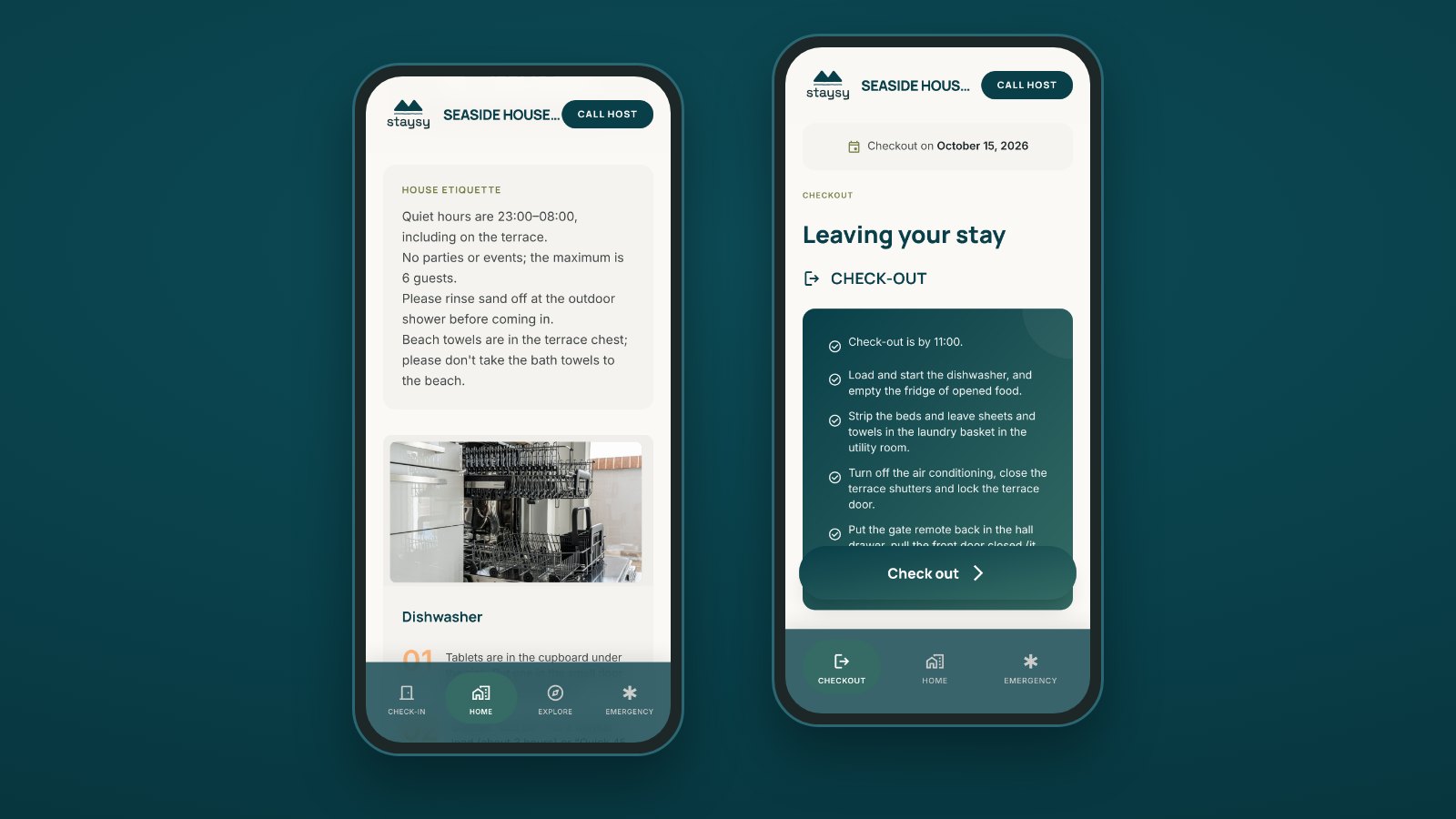
- Self check-in: check-in steps and access codes guests can read before they arrive, WiFi and house rules that appear once they check in, and a checkout checklist on checkout day in the property’s time zone.
- WiFi and appliances: a scan-to-connect QR code, plus how-to guides with photos for each appliance.
- Local recommendations: your favorite coffee, restaurants, and hidden gems in one curated area guide, with places nearby suggested when you add a property.
- House rules: quiet hours and rules guests read in the flow of the stay.
- Getting there: taxi, metro, bus, and train directions, visible before check-in.
- Emergency and safety: tap-to-call and WhatsApp contacts, the property location, and nearby medical services.
- Works offline and in three languages: key details stay available with a weak signal, and guest screens switch to English, Spanish, or French automatically.
Built for hosts with one property or many
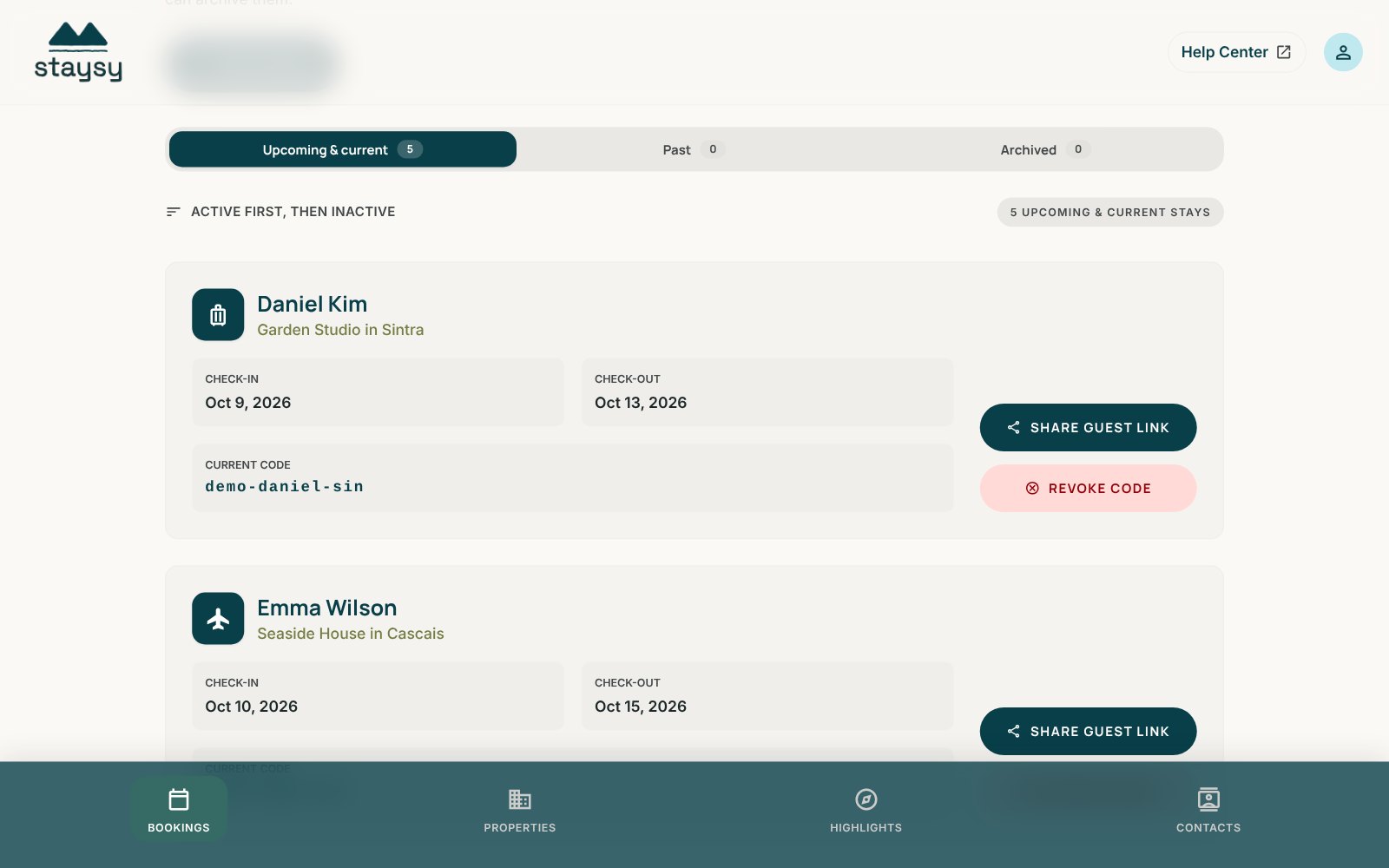
Each booking gets its own link tied to the stay dates, which you can edit or revoke at any time. Reuse your content across every listing and change only what differs per property, such as access codes or appliances. You also get a notification when guests check in or out, so you know the stay is underway without chasing messages.
Frequently asked questions
What should be in an Airbnb welcome book?
An Airbnb welcome book should include a welcome note, check-in and access instructions, WiFi and appliance details, house rules, local recommendations, directions and parking, emergency and safety information, and checkout instructions.
Can I make an Airbnb welcome book for free?
Yes. You can write one in any document editor, or build a digital welcome book in Staysy, where a short setup creates the main sections for you. Staysy’s Free plan covers your first property, with no credit card required.
Should my Airbnb welcome book be printed or digital?
Digital is usually the better choice, because guests can read it before arrival and you can update it instantly. Many hosts add a printed card with a QR code in the property so guests can open the digital version on their phone.
How long should an Airbnb welcome book be?
As short as possible while still answering the common questions. Aim for short, skimmable sections that a guest can scan in a few minutes, and put the most urgent details, like check-in and WiFi, first.
Can I use one welcome book for several properties?
Yes. Keep shared content, such as your house rules, checkout steps and contacts, the same across listings, and change only property-specific details like access codes and appliances. In Staysy, you can start a new property from an existing one and copy those parts in one step.
Getting started
A great welcome book does not take hours of work. It needs the right information, in the right order, in a place guests can always reach. Staysy keeps all of it in one place, so guests feel at home from the moment they arrive and you answer fewer messages.